 AOMEI Backupper


Extended Security Updates for Windows 10: Everything You Should Know
Microsoft Windows 10 will end of support on October 14, 2025, and many users are seeking Extended Security Updates for Windows 10, so they can continue using it for a longer period. If you are one of them, here is a complete guide.

By Jonna Updated on September 18, 2025


With Windows 10 officially reaching the end of support on October 14, 2025, millions of users face two choices - either upgrade to Windows 11 or stick with Windows 10. For the latter option, getting Extended Security Updates for Windows 10, which is the topic we will discuss here, is necessary to protect the system from cyberattacks and malware.
What Are Microsoft Extended Security Updates?
Microsoft's Extended Security Updates program is designed for users who need more time beyond the official end-of-support period. It focuses on keeping older systems safe from vulnerabilities without adding new features or performance improvements. Essentially, Extended Security Updates include:
✅ Critical and important security patches that protect against malware, ransomware, and system exploits.
✅ Regular updates are delivered through the familiar Windows Update system.
❌ What's NOT Included in Windows 10 ESUs: new features or design changes, security bug fixes, free technical support from Microsoft, compatibility with new apps or hardware, etc.
Will Windows 10 Get Extended Security Updates?
Yes, Microsoft began offering its Extended Security Updates for Windows 10 in July 2025. Microsoft recognizes that millions of users, particularly enterprise customers, won't be ready to upgrade to Windows 11 immediately. To bridge this gap, they announced a three-year Windows 10 ESU program that will run through October 2028.
However, to qualify for Windows 10 Extended Security Updates (ESU), a device must be running Windows 10 version 22H2 with the most recent cumulative update (KB5046613 or newer) installed. For individual consumers, enrollment requires signing in with a valid Microsoft account - note that child accounts aren’t eligible.
How Much is the Extended Security Update for Windows 10?
Cost is a major factor when deciding whether to purchase Extended Security Updates for Windows 10. Microsoft usually sets ESU pricing on a per-device, per-year basis. The base license will cost $61 USD per device for Year 1, similar to the Windows 7 ESU Year 1 price, and the fee often increases annually. For context, ESU pricing worked like this:
- Year 1: Lower cost per device.
- Year 2: Price doubled.
- Year 3: Price tripled compared to year one.
The Availability of Windows ESUs Matters for:
1️⃣ Commercial users: Organizations can purchase ESUs through the Microsoft Volume Licensing Program. The price increases each year, for a maximum of three years.
2️⃣ Individuals: The personal-use ESU program for Windows 10 is available for a one-time purchase of $30 for a single year of coverage, which expires on October 13, 2026. Microsoft also offers to get Extended Security Updates for Windows 10 free by syncing your PC settings with OneDrive or redeeming 1,000 Microsoft Rewards points.
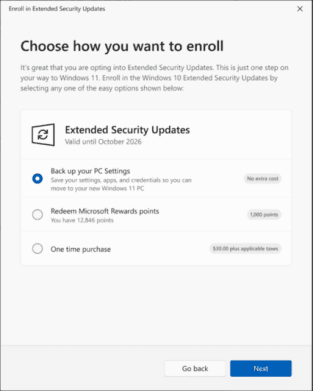
3️⃣ Cloud customers: ESUs are available at no additional cost for Windows 10 virtual machines running in certain Azure environments and for Windows 365 users.
And for Purchase of ESU License:
👉 You'll need to make a Windows 10 ESU purchase from Microsoft or an authorized reseller.
👉 Businesses typically use the Volume Licensing Service Center (VLSC), while individuals will likely purchase through the Microsoft Store or partners.
👉 Please remember, the Microsoft extended security updates cost is subscription-based and rises each year (similar to the Windows 7 ESU program), for a maximum of three years. For example, if you decide to jump into the program in Year Two, you'll have to pay for Year One too.
How to Enable Extended Security Updates for Windows 10
Enabling Extended Security Updates for Windows 10 requires both licensing and setup steps. Unlike regular updates, ESUs must be purchased and activated before they start working. Here's how you’ll be able to enable them once they’re available.
Step 1. Purchase a License
Head to Microsoft's official site or an authorized reseller to complete your Windows 10 ESU purchase. Businesses may use Volume Licensing Service Center (VLSC).
Step 2. Download the Activation Key
After purchase, Microsoft will provide an activation key specific to ESU.
Step 3. Install the Update Preparation Package
Before you can receive ESUs, you must install a "pre-requisite update package' that enables your system to recognize ESU keys. This must be installed before applying the ESU license key.
Step 4. Activate Your ESU License
Once you’ve purchased ESU:
1. Press Windows + I to open Settings.
2. Go to Update & Security > Activation.
3. Select Change product key.
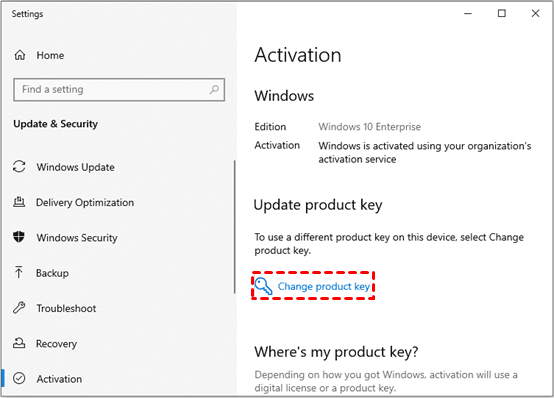
4. Enter the ESU activation key provided by Microsoft.
Step 5. Check for Updates
Go back to Settings > Update & Security > Windows Update. Click Check for updates to confirm ESUs are now being delivered.
Best Way to Create Full & Automatic Backup for Windows 10 - FREE
Whether or not you choose Extended Security Updates, backing up your Windows 10 system is crucial. Security patches can only do so much, but having a reliable backup ensures your data and system remain safe even in the worst-case scenario. One of the best tools for this task is AOMEI Backupper Standard, a free and powerful Windows backup software trusted by millions worldwide.
This software provides comprehensive protection for your Windows PCs with these standout features:

 AOMEI Backupper
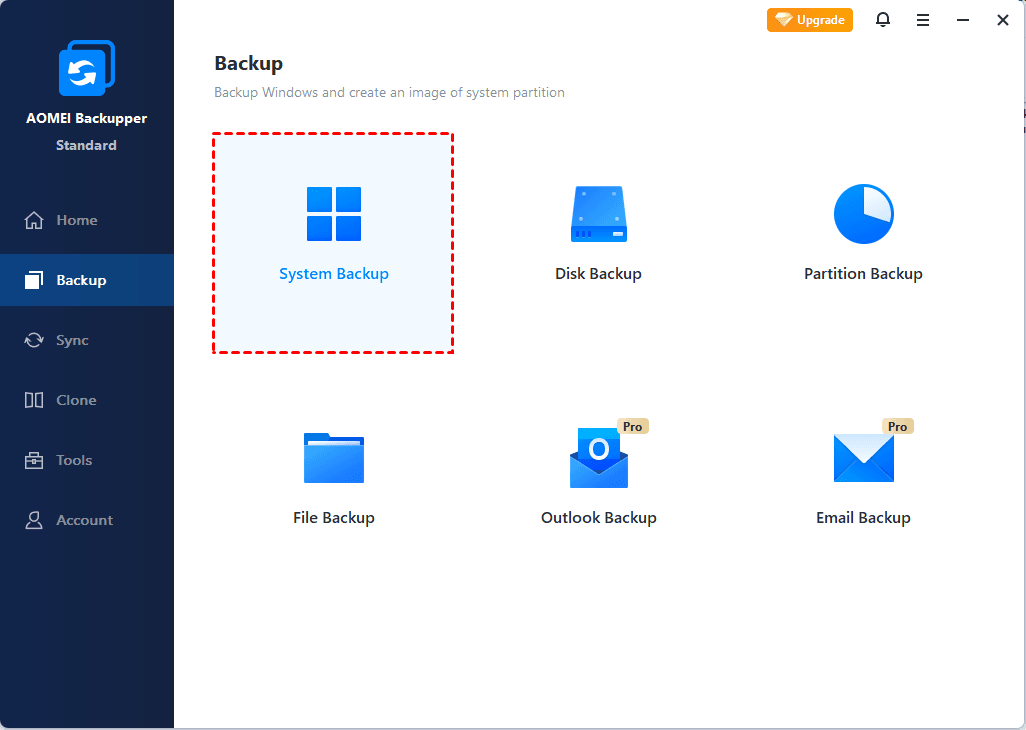
- Full system backup: Create an image of your entire OS, including files, settings, and applications. It also offers Disk Backup to backup entire system drive, Partition backup to backup specific partitions, and File Backup for individual files/folders backup.
- Scheduled backups: You can set up automated backups daily, weekly, monthly, or at specific events like USB plug in.
- Multiple device support: You can backup to external hard drive, NAS, network location, DVD, or any other locations that File Explorer can detect.
- Quick restore: You can restore the backup image swiftly, and it allows you to restore to different hardware(available in Pro version).
 100% Secure
Just download and run AOMEI Backupper, navigate to Backup > System Backup for a full OS backup.
FAQs on Extended Security Update for Windows 10
#1. Can I still use Windows 10 after October 14, 2025?
Yes, you can. Your computer won’t stop working, but it won’t receive free security patches anymore. That’s where ESUs come into play if you want ongoing protection.
#2. Is Windows security update necessary?
Absolutely. Security updates patch vulnerabilities that hackers exploit. Without them, your PC becomes increasingly susceptible to malware, ransomware, and data theft. Extended Security Updates for Windows 10 exist precisely because these patches are critical.
#3. Can I upgrade from Windows 10 to 11 for free?
Yes. Eligible Windows 10 users can upgrade to Windows 11 for free as long as their hardware meets the requirements, such as TPM 2.0 and Secure Boot. This option provides long-term security without the extra ESU costs.
Summary
Windows 10 reaches end of support in October 2025, marking a significant milestone, but Microsoft's Extended Security Updates for Windows 10 offer a lifeline for those not yet ready to upgrade. By purchasing Extended Security Updates (ESUs), businesses and individuals can continue to receive critical security patches for up to three years.
Still, don’t forget to protect your files with regular backups using free tools like AOMEI Backupper, for automatic and complete system protection. Also, you can use software to clone Windows 10 to new hard drive for a quick and secure migration.
