FastRecovery



Quick Guide: WD Hard Disk 2TB Data Recovery [Elements, My Passport, etc]
In this WD hard disk 2TB data recovery quick guide, you’ll learn the possible reasons and how to recover data from WD Elements, My Passport, etc., step by step.

By Ivy / Updated on March 9, 2026


WD 2TB hard disks (WD Elements, Black, My Passport, etc) are a popular choice for storing large amounts of data, including documents, photos, videos, games, business files, etc., holding irreplaceable memories and valuable data, for their digital lives.
However, like any storage device, they are not immune to issues like accidental deletion, file system corruption, or physical damageand causing data loss. You may feel stressed and overwhelmed, calm down and take a breath, that’s where data recovery tools and services come into playand we’ll show you them.
Common Causes of WD Hard Disk 2TB Data Loss
Despite WD being known for producing durable drives, data loss can still happen due to various reasons. Here are some of the most common causes of data loss on WD 2TB HDDs:
| Reasons | Description |
| Logical Corruption | Accidental deletions and file system errors are the most frequent logical errors, leading to data loss. This happens due to improper shutdowns, software crashes, or errors during data transfer. |
| Bad Sectors and Wear and Tear | Over time, hard drives accumulate bad sectorsand persistent wear and tear can also lead to areas of the disk being unusable, causing data to become inaccessible. |
| Virus/Malware Attacks | Malware and viruses are another major threat to data stored on any hard drive. These malicious programs can corrupt, encrypt, or delete files, making recovery challenging. Ransomware, in particular, is a growing concern, as it locks users out of their files until a ransom is paid. |
| Physical Damage | Accidental drops, impacts, or exposure to extreme conditions (heat, moisture, etc.) can physically damage the internal components of the hard drive. At this point, there is a high risk of data loss, and professional recovery services are required. |
How to Perform WD 2TB Hard Disk Recovery Step by Step
Here’s a step-by-step guide on how to perform WD 2 TB hard disk data recovery, including pre-recovery considerations and 3 useful methods. Before diving into data recovery, it's important to understand the risks and precautions to take. Here are the do’s and don’ts to ensure the best chance of success:
- 👉 Stop using the drive immediately after realizing data loss, e.g., avoid writing any new data to the drive or formatting it, as these operations may overwrite your data, greatly reducing the chances of success.
- 👉 Use reliable data recovery software like FastRecovery, with superior file recovery and compatible with all series of WD hard disks.
- 👉 Start data recovery as soon as possible.The sooner you act, the higher the chances of data recovery.
- 👉 Avoid DIY repairs for physical damage. If your drive is making unusual noises or not being recognized by your computer, don't attempt to open it yourself and contact WD hard disk data recovery first.
Way 1: Recover Data from 2TB WD Hard Disk (Elements, My Password, etc)
One of the most effective tools for recovering deleted or lost data from WD 2TB HDD is FastRecovery, a powerful software specifically designed for data recovery, and compatible with all series of WD hard disks, e.g., WD Elements, My Passport, etc.

 FastRecovery
- Simple and intuitive interface, without technical skill required.
- Scene matching scan algorithms: Quick Scan for deleted files while Deep Scan for more complex scenarios, such as formatted drive, corrupted drive, virus attack, etc.
- 1000+ data formats: Recover deleted documents (e.g., recover word files), images, audios, videos, compressed files, emails, etc.
- Preview files before recovery: It helps toensure the files you need are there and haven’t been corrupted.
- File filtering: You can filter files by type (e.g., images, documents, videos),file name or extension, making it easier to locate specific data.
In addition, it’s safe & reliable to use as it’s read-only and does not cause data overwriting. Don’t download and install any recovery software on the WD 2TB hard disk, as it may overwrite the deleted files.
Step 1. Download FastRecovery and install it on your computer. Insert your WD hard disk and be sure it’s detected in File Explorer, displaying as removable media.
Step 2. Launch FastRecovery after installing. It will navigate to the Hard Drive Recovery section, where you can select your WD 2TB hard disk and click Scan.

Step 3. It will start Quick Scan automatically to find deleted files within 3-5 seconds. You can then filter (e.g., data type, file name, extension, etc) and preview files you want to recover.
Step 4. Once you’ve selected the desired files, click Recover and select a new location to save them safely.
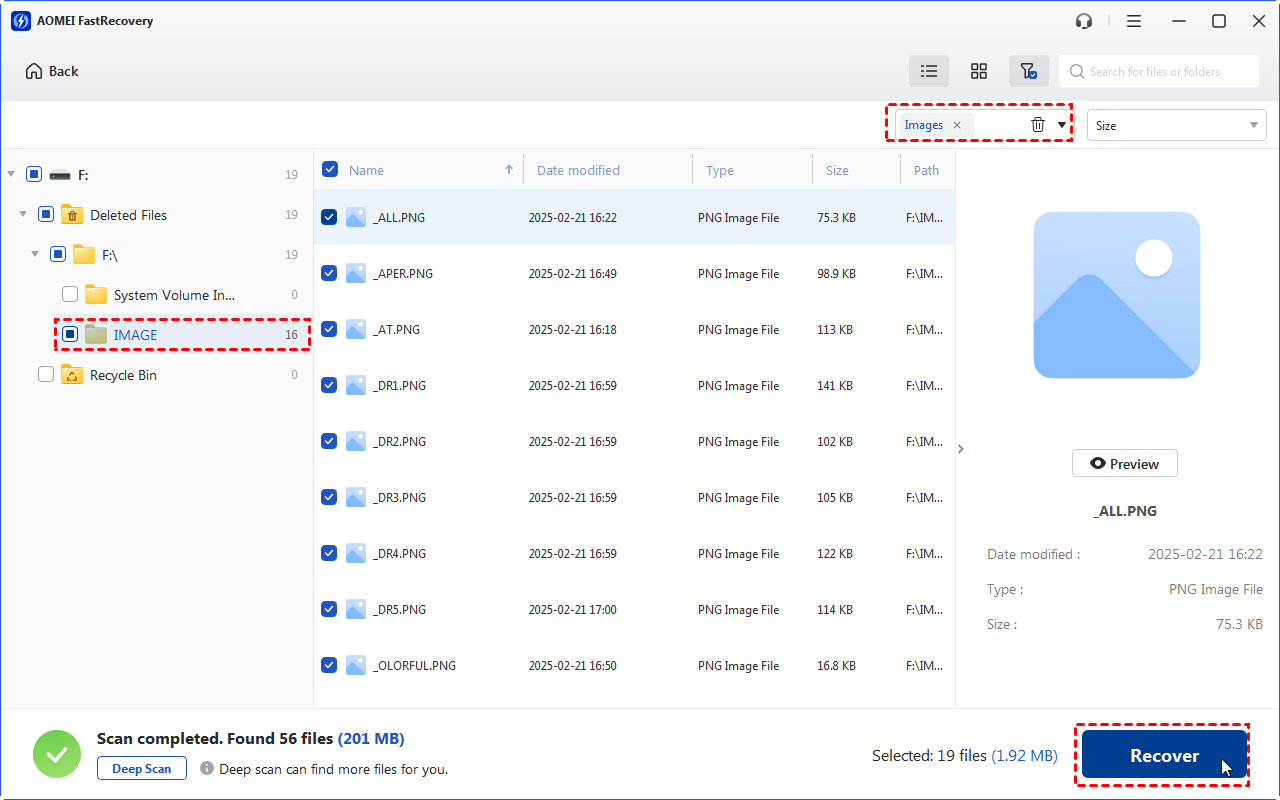
-
Always recover files to a different location (not WD 2TB hard disk) to avoid data overwriting, making data recovery more difficult.
-
If you can’t find deleted files, click the Deep Scan to scan this drive more thoroughly.
Download this free software to recover data now!
Way 2: Repair File System Errors using CHKDSK
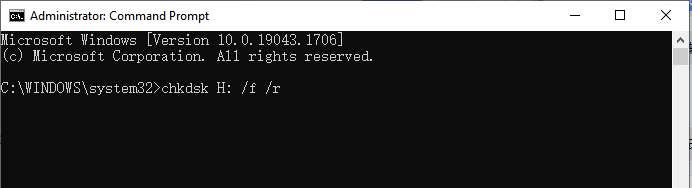
Sometimes, file system errors can be the cause of data loss, and running the CHKDSK command helps repair these issues. Here's how to use it:
Step 1. Type cmd in the Start menu search box and select Run as Administrator to open Command Prompt with administrative privileges.
Step 2. In the Command Prompt window, type chkdsk X: /f/r and press Enter to let CHKDSK check the file system errors and fix them. Replace X: with the letter of your WD 2TB drive.
Way 3: Seek Help from WD Hard Disk Data Recovery Services
Sometimes, data loss can be too severe to recover using DIY methods. Here are signs that you may need to seek professional services:
- Your drive makes clicking or grinding noises.
- Your drive can’t be detected.
- DIY Tools do not work.
If you are in one of these situations, it’s time to consult a professional data recovery service. They have the necessary tools and cleanroom facilities to handle severe issues, including damaged internal components.
WD has partnered with companies such as Ontrack, DriveSavers, Secure Data Recovery Services, and others to offer their services worldwide. You can contact them on the WD data recovery page for details.
How to Prevent Data Loss on WD Hard Disk
Preventing data loss is always better than having to recover it. Hereare some common methods to protect your data well:
Regular Backups of WD Disk Data
- Create Periodic Backups: Set up scheduled backups, whether daily, weekly, or monthly, and you don’t need to worry about data loss if something goes wrong with your hard drive.
- Use Cloud Storage and External Drives: Store backups on cloud services like Google Drive or Dropbox to access your files anywhere and back up to external hard drives like WD Elements for extra security.
Preventive Maintenance for WD Drives
- Defragment Your Drive: Hard drives store files in little chunks spread across the disk. Over time, this can slow things down. Running a defragmentation tool will help the drive (not SSD) work faster and more efficiently.
- Scan for Viruses: Keep your antivirus software up to date and run scans regularly to protect your drive from harmful threats, which can cause data loss.
- Check Drive Health: Use tools like WD Drive Utilities to check the health of your WD hard drive. It’ll alert you to any issues like bad sectors or overheating before they cause problems.
- Store Your Drive Properly: Make sure to keep your WD 2TB hard drive in a safe, cool, and dry place. Avoid dropping it or exposing it to extreme temperatures, as this can make the drive unusable.
Conclusion
When it comes to WD hard disk 2TB data recovery, time is critical. The sooner you act, the higher the chances of data recovery. Every time you use the hard drive after data loss, your lost files may be overwritten, making recovery more difficult. Please stop using the drive immediately and recover data using recovery tools or services as soon as possible.
 100%
Clean & Secure
100%
Clean & Secure