
By Lora
 / Last Updated July 22, 2021
As the last hurdle for the computer to protect the files and data deleted by users, the Recycle Bin keeps the deleted files for quite a long time until the user has permanently delete those data, which has redeemed a lot and avoided plenty of losses for users.
However, the storage space of the computer is limited. In order to ensure the running speed of the computer, some users also regularly clean the recycle bin.
After deleting some trivial files, users may find that they have deleted important files by mistake, such as some study materials, work data, contracts, etc., or some files that are not of economic value but are emotionally precious, such as family travel photos, graduation vlogs, etc.
Can I recover deleted files from Recycle Bin?
It is not difficult to imagine the frustration and regret of users when faced with the situations above. Then, is it possible to recover deleted files from Recycle Bin? If so, then how about when the Recycle Bin has been emptied?
Certainly yes. So this post is to help users who have a burning desire to recover deleted files and data to retrieve their important materials or precious memories. Follow these three methods to conduct Recycle Bin recovery, and to recover files from Recycle Bin after empty.
3 methods to perform Recycle Bin recovery
These three methods are applicable to two situations. First, the Recycle Bin has not been emptied, and second, it has been emptied already. Now let’s come straight to the point.
Method 1: Recover deleted files from Recycle Bin directly
Step 1. Double click “Recycle Bin” to open it.
Step 2. Locate the file you have just deleted.

Step 3. Right-click the file, then click “Restore”.

Then your file will come back to the location where it was before being deleted.
If you realized you have deleted something important immediately you did so, and haven’t emptied the Recycle Bin, don’t touch anything, just try the shortcut “Ctrl+Z” to undo your deletion.
Method 2: Recycle Bin recovery with the previous version
If unfortunately, your Recycle Bin has been emptied, you can still try the following method to recover files from Recycle Bin after being empty with the previous version.
Step 1. Start “Windows File Explorer” on your PC.
Step 2. Then locate the folder which is used to save the deleted file.

Step 3. Right-click it and then click “Properties”.

Step 4. Go to “Previous Version” and select the version which is exactly the one before you delete it, then click “Restore”.

Then, congratulation, your file is back.
Method 3: Recycle Bin recovery from File History Backup
This method is also feasible in the situation where the recycle bin has been emptied. To recover files from Recycle Bin after empty, follow these steps.
Step 1. Start “Control Panel” on your PC, then click “System and Security”.
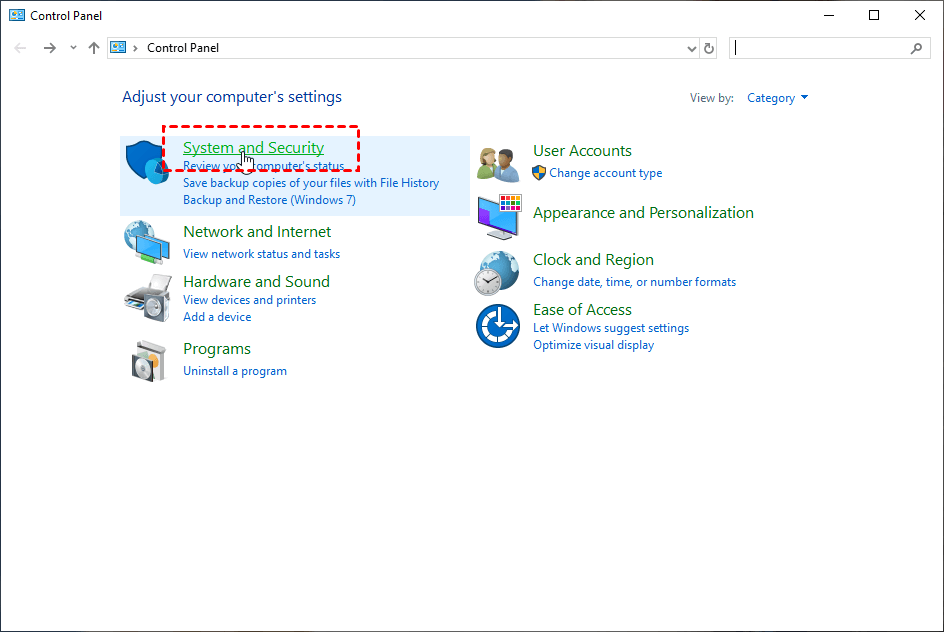
Step 2. Go to “File History”.

Step 3. Select “Restore personal files”.

Step 4. Locate your deleted files, then click the “Recycle” icon to restore your deleted files.

Then your file will get retrieved to the location where it was before being deleted, you can check if it is restored in your folder.
Conclusion
In this post, three ways to recover deleted files from Recycle Bin are introduced. You can choose a practicable approach based on the problem you are experiencing and the specific situation. Hope it will be of help to you! By the way, Data security is closely related to every user, in order to keep your data safe and avoid loss due to the accidental deletion of important files, it is highly recommended that you regularly back up important files, save copies of important files on different storage devices, and use the "Shift+Delete" shortcut cautiously.


