



Why Is Backup So Important?

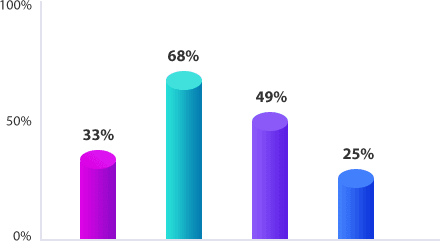
Statistics by Computer Economics in 2018 shows that, in the first half of 2017, U.S. companies lost more than 8 billion dollars caused by data loss. A report by WestWorld in the United States is even more striking! Most companies believe that 100M data is worth more than 1million dollars! Data protection has become inevitable for tons of enterprises. To reduce such loss fundamentally, people have to raise their awareness of data protection.

caused by storing files or folders arbitrarily.

caused by not preparing for data loss.

caused by intrusive virus attacks.

caused by man-made mistakes.

What Can AOMEI Backupper Do For You?

AOMEI Backupper is the free easiest backup software for Windows featured with backup, restore, clone, sync, and recovery features. Easy-to-use interface and powerful features can not only meet your real needs but also brings you good experience. It is clean and safe so that you can install on any computer at home or for business.

  • Smart Backup

    Backup Scheme
    Always forget to back up but worry about data loss? Backup scheme provide a better solution for you. Open AOMEI Backupper, and set a schedule to back up daily, weekly or monthly.
    Schedule Backup
    Many people sometimes want to back up files or folder that is important to them. Starting as this point, you just need to set a schedule backup to back up essentials automatically.
    Incremental/Differential Backup
    Want to save backup time and storage space? Create set-and-forget tasks with incremental or differential backups meets your needs perfectly.
  • Flexible Restore

    Universal Restore
    You can restore backup image to computers with dissimilar hardware, or transfer OS from physical machine to virtual one(P2V).
    Selective Restore
    Restore all take long time and too much space? Just choose what you really need to restore without any limitation.

  • Powerful Clone

    System Clone
    Short time spent on OS migration than you thought!Migrate OS between HDD and SSD without reinstalling Windows systems and applications as long as ensure system bootable after migration.
    Disk Clone
    Clone your hard drive to another HDD or SSD, even clone large disk to a smaller one, for example, GPT / system disk clone
  • Useful Settings

    Real-Time Sync
    Change occurred, and worry about files or folders not syncing? Real-time sync feature enables monitor files/folders for changes and synchronize newly-added, modified or deleted files/folders from source to target path.
    Encrypt Images
    Restored illegally never happens! AOMEI Backupper adopts high technologies to encrypt your backup images in case of restoring illegally or mistakenly.
Inquire More

Good As Recommended!

  • Reviews

    The Standard edition of AOMEI Backupper is free to use. It installs very quickly and does not require configuration. When it comes to the interface, the tool is unpretentious and opts for an organized .

    Woohoo! Successfully moved Windows 10 OS from my 100GB SSD to 1TB HDD!! The longest time was spent on backing up my old photos/videos. Ah yeah...

    AOMEI Backupper tech plus is a good choice because it supports universal restore, which means it achieves to restore with dissimilar hardware. So, if you replace the HDD with SSD, AOMEI Backupper will help technician resolve many little but complicated issues.


  • Trusted By Top Tech Medias

    I really like your program. I have tried several programs, but found out that your Aomeitech is the best for me. Thank you again and have a pleasant day!

    Woohoo! Successfully moved Windows 10 OS from my 100GB SSD to 1TB HDD!! The longest time was spent on backing up my old photos/videos. Ah yeah...

    By the way, thanks for sharing the program.The Aomei is now at the same level of Acronis, Macrium Reflect. EaseUS among others of its kind...