AOMEI Image Deploy

Best Image Deployment and Network
Clone Software

Deploy Windows image for multiple computers at same time.
Run stably and quickly to get consistent environments without error.
Support Windows 11/10/8/7 and Windows Server 2019/2016/2012/2008.

Best Free Image Deployment Software

In today’s IT environment, manual disk imaging is impractical. The tedious process of installing systems one by one on multiple computers is a huge waste of time and resources. AOMEI Image Deploy is the best free Windows deployment software that performs large-scale Windows system deployments over network. It is an ideal way to deploy batches of PCs and servers simultaneously.

Free Image Deployment Software

Many system deployment tools are expensive, while AOMEI Image Deploy offers free edition to deploy all Windows PC systems.

Centralized Deployment

Efficiently streamline large-scale system imaging options by centrally deploying system to all client computers with same LAN.

Real-time monitor

Real-time percentage display keeps you informed of the progress of system restore. And you will receive a prompt if the OS recovery is successful or not.

Deploy to Dissimilar Hardware

Deploy images to client computers with different hardware, like CPU or motherboard and ensure successful system boot up.

Preset name and IP address

Automate the allocation of names and IP addresses for client computers that finish deployment, saving time on presetting each computer.

Easy Deployment

AOMEI Image Deploy is an easy-to-use tool. You can simply follow the prompt to deploy Windows image for all computers.

AOMEI Image Deploy Edition Comparison

Upgrade to Technician Edition for full features or business use

AOMEI Image Deploy Free

$
0
.00
Download Freeware
  • Deploy image to Maximum 20 client computers.
  • Preset client computers name.
  • Preset client computer IP address.
  • Deploy image to dissimilar hardware.
  • Provide charged technical service to clients.
  • Business usage.

AOMEI Image Deploy Technician

$
199
.00
Buy Now
  • Deploy image to Maximum 20 client computers.
  • Preset client computers name.
  • Preset client computer IP address.
  • Deploy image to dissimilar hardware.
  • Provide charged technical service to clients.
  • Business usage.

3 Steps to Deploy Windows to Multiple Computers

  • Step 1

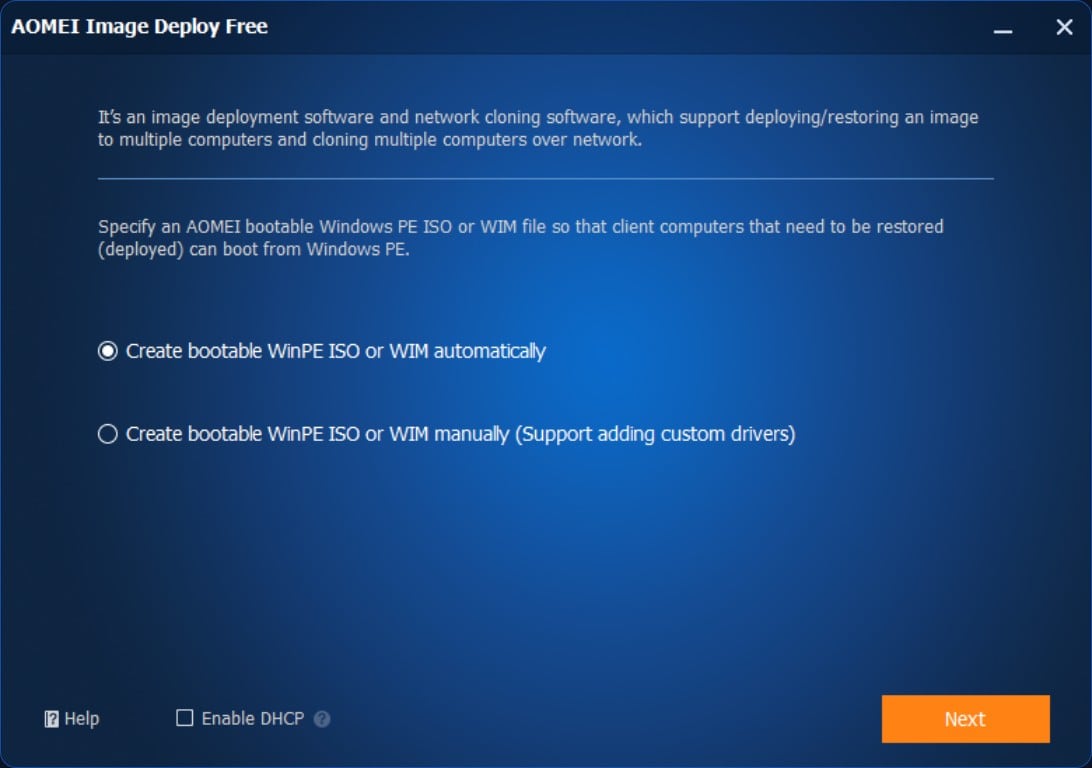
    Create bootable Win PE

    Run AOMEI Image Deploy. Choose to create bootable WinPE ISO or VIM automatically or create it manually.

  • Step 2

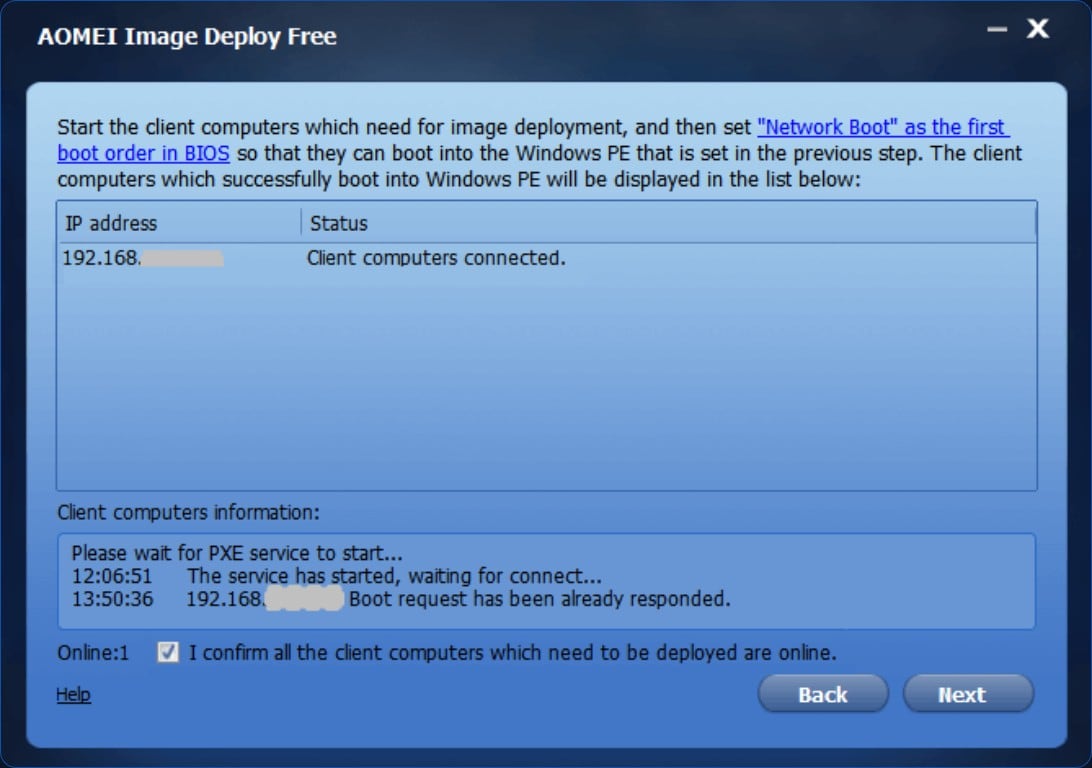
    Connect to client computers

    The computer will boot into AOMEI Image Deploy recovery environment and wait for connect with client computers.

  • Step 3

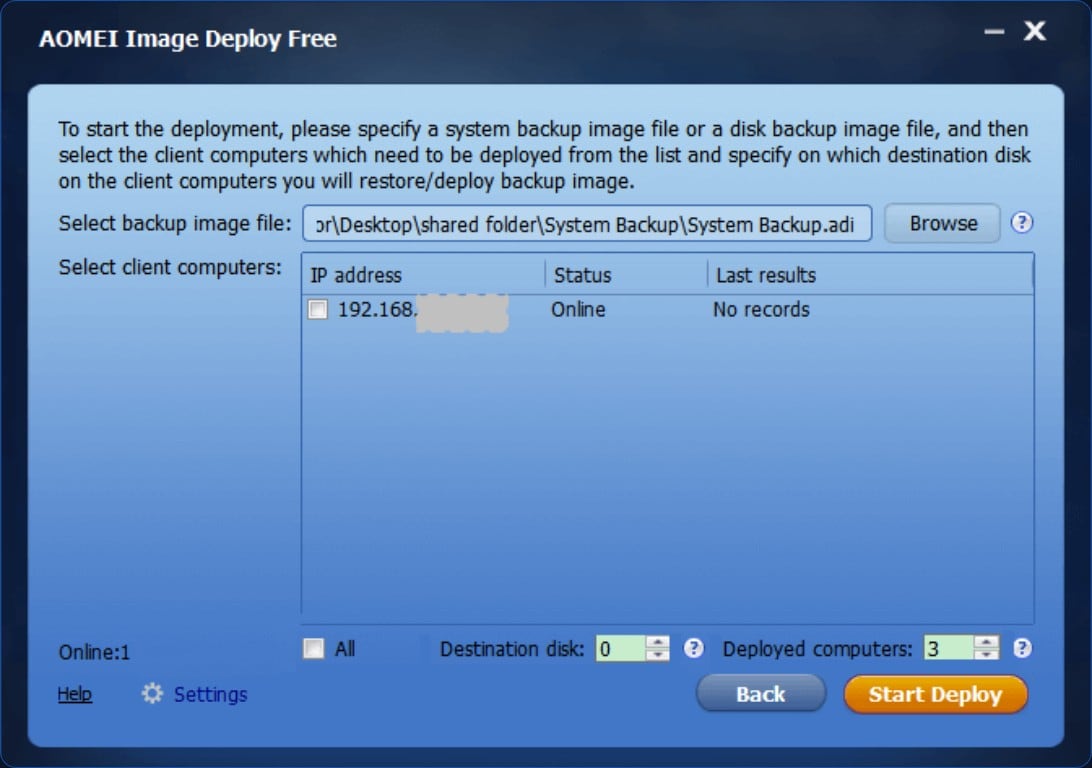
    Choose an image file to deploy

    Click “Browse” to select backup image file and choose client computers. Click “Start Deploy” to deploy image to computers simultaneously.

What Our Users Say?

Sarah Johnson
- Computer maintenance technician of middle school

We image system for our school computers every year. It took us nearly 4 hours to complete OS image deployment before we had the AOMEI Image Deploy. Now it only takes less than 2 hours to deploy images with AOMEI Image Deploy.

Michael Smith
- Senior IT technician

AOMEI Image Deploy is simply excellent for Windows image deployment! Its intuitive interface coupled with powerful features makes deploying system images a breeze. It can be the best choice for system administrator.

Emily Brown
- IT repair and maintenance manager

Powerful and efficient. We wanted to install Windows 11 to our 50 computers. Thanks to AOMEI Image Deploy, we were able to deploy the same system on all our computer quickly.

Ready to Deploy Windows to all Computers?

Download the best Windows image deployment software and install Windows on multiple computers now!

Free Download