FastRecovery



Helium Hard Drive Data Recovery [Full Guide]
You can easily deal with Helium hard drive data recovery issues, especially for logical errors, using a simple yet powerful data recovery. For physical damage, professional services are needed.

By Ivy / Updated on May 8, 2026


A helium hard drive is a type of hard disk drive (HDD) that uses helium gas inside the drive instead of regular air. This small change in the internal atmosphere makes a big difference in performance, efficiency, and overall reliability.
However, you may still experience data loss on helium hard drive due to different reasons, e.g., accidental deletion, formatting, power surges, software crashes, file system errors, and more. Don’t worry about it much, and this article will show you how to deal with helium hard drive data recovery effectively.
Helium Hard Drive vs. Traditional HDDS
Traditional hard drives are filled with regular air that surrounds the internal components, such as the spinning platters and read/write heads, which creates more friction inside and increases power consumption, and generates more heat.
In contrast, helium-filled drives use helium gas, which is lighter and less dense than air, allowing the platters to spin more smoothly and quickly. With it, you can benefit from:
- Higher Storage Density: Since helium allows for more platters, these drives can store much more data in the same physical space compared to traditional HDDs.
- Lower Power Consumption: With reduced friction and power consumption, helium drives become ideal for large-scale operations, e.g., enterprise storage, data centers, and high-capacity needs, such as video production.
- Better Durability and Lifespan: Helium-filled drives experience less wear and tear and are more resistant to mechanical failures, making them more reliable for long-term use in demanding environments.
How Does Data Recovery Work on Helium Hard Drives?
Understanding how recovery works can help you assess your options if you find yourself in a data loss situation. As with the sealed environment and complex components, you can’t use DIY tools for physical damage or when the drive is inaccessible.
To recover data from failing helium hard drives, experts rely on:
- Clean Rooms: In these highly controlled environments, the drive is opened to prevent dust and other contaminants from damaging the drive's sensitive internal components. A clean room ensures that the integrity of the helium environment is maintained and the recovery process is as safe as possible.
- Specialized Tools: Technicians use industry-standard methodsto handle the delicate internal components of helium hard drives.This includes specialized parts for diagnosing and repairing platters, actuator arms, and other mechanical parts that may be causing failure.
- Advanced Software: In some cases, data recovery software is mainly used to recover files, especially in logical failure scenarios. The software helps recover lost data from file system corruption, accidental deletion, virus infection, etc.
The Recovery Process: From Diagnosis to Restoration (for Valuable Data)
- Initial Assessment: The first step is diagnosing the issue with the drive. A technician will perform non-invasive tests to determine whether the problem is physical (hardware failure) or logical (file system corruption).
- Recovery Plan: If the drive is still operational, the technician will create a plan to preserve as much data as possible. If the drive is severely damaged, it may require more intensive methods like the chip-off method or parts replacement.
- Clean Room Access: If the issue is hardware-related and the drive needs to be opened, it will be taken into a clean room (a dust-free, controlled environment) to minimize contamination risk while opening the drive.
- Component Repair or Replacement: In cases of mechanical failure, technicians may need to repair or replace faulty components (e.g., damaged actuator arm, spindle, or platters) using specialized tools and replacement parts.
- Data Extraction: Once the drive is fixed, the technician will attempt to extract the data. This involves copying the data from the hard drive to another functional storage device, depending on the customer’s requirements.
In addition, you still need to consider the costs and turnaround times. Prices vary from a few hundred dollars to several thousand, depending on the severity of the damage and the amount of data being recovered. Turnaround times generally depend on the complexity of the recovery. Basic cases may take a few days, while more advanced recoveries may take weeks.
Recover Data from Helium Hard Drive using DIY Software
When it comes to recovering data from helium hard drive, many users may turn to DIYtools like FastRecovery as a first line of defense, especially for simple recovery, e.g., accidental deletion, virus infection, etc.
With a simple and intuitive interface and powerful data recovery capabilities makes it attractive to the majority of people without costly professional recovery services.
 FastRecovery
- Simple and easy to use, no technical skills required.
- Fast and powerful algorithms - Quick Scan searches for deleted files quickly, while Deep Scan is for more complex scenarios.
- Recover deleted documents (e.g., recover Word files), images, audios, videos, compressed files, emails, etc., and more than 1000 data formats.
- Sort, Search, filter, and preview files, making it easier to locate and recover specific files or folders.
-
Download and install FastRecovery to a new location besides the Helium drive to avoid data overwriting.
-
Any newly added data or disk formatting can overwrite data. Please avoid these operations after realizing data loss.
Step 1. Open FastRecovery after installing, then click Deleted Files Recovery, specifically designed for quick recovery. You can also choose a more suitable alternative. All of them can help you retrieve data without causing any damage.
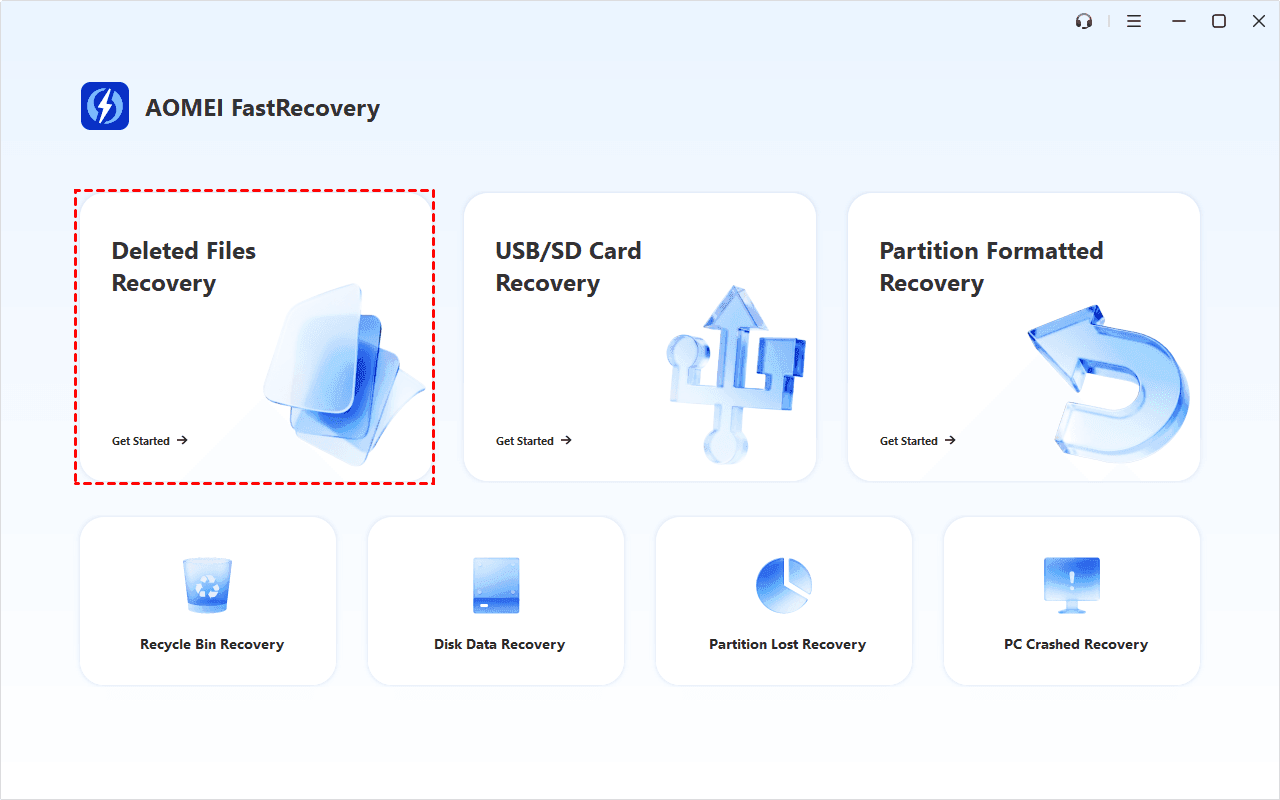
Step 2. Select the Helium hard drive and click Scan to get started.

Step 3. It will start Quick Scan automatically to find deleted files on the Helium drive. You don't need to wait too long. Scan time mainly depends on disk size and health, especially regarding bad sectors or file system corruption.
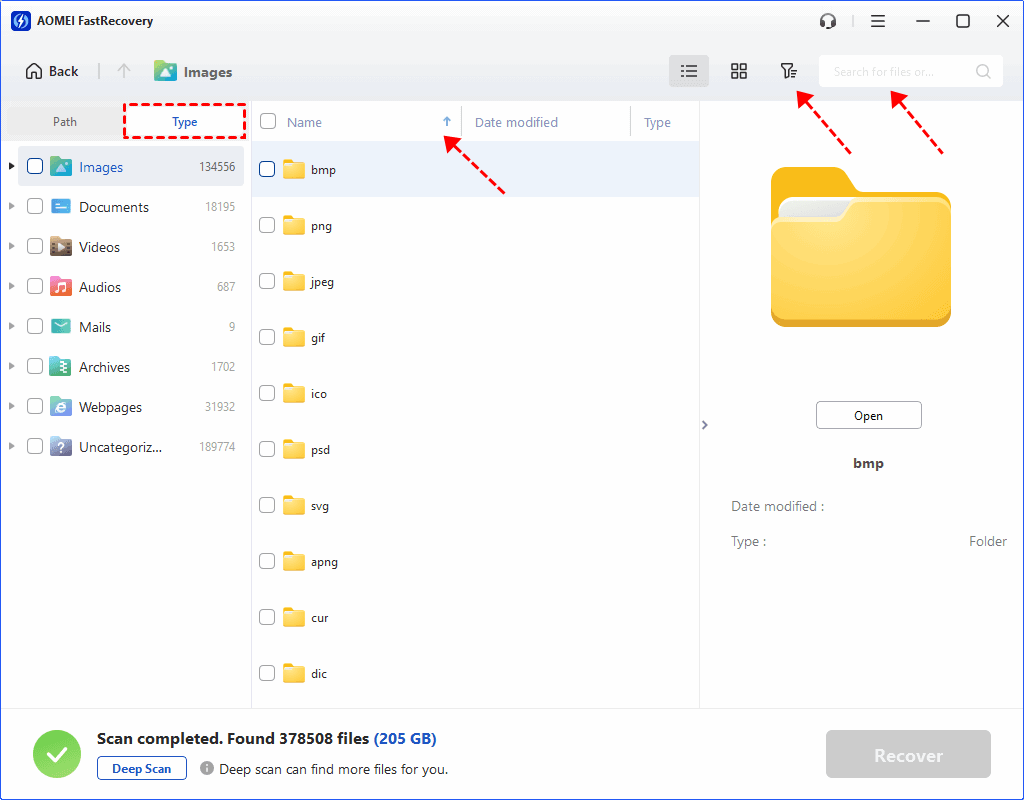
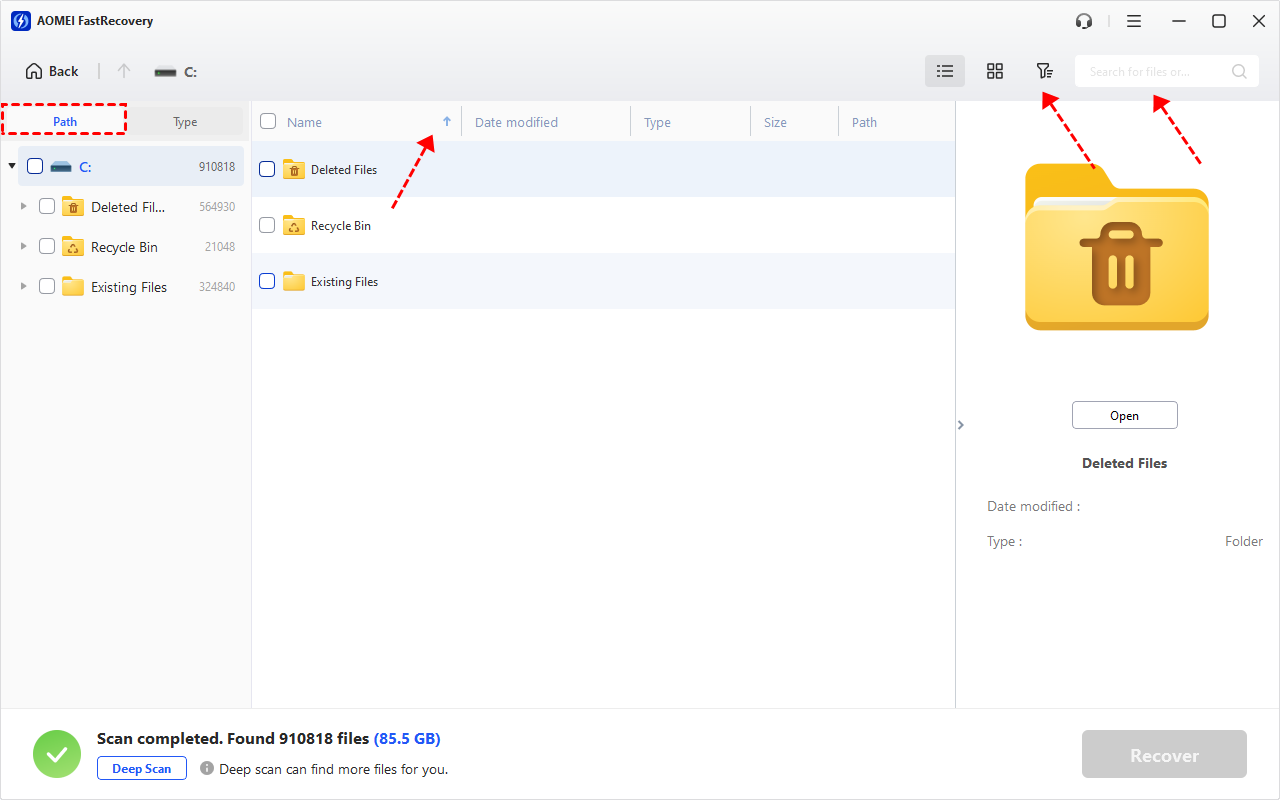
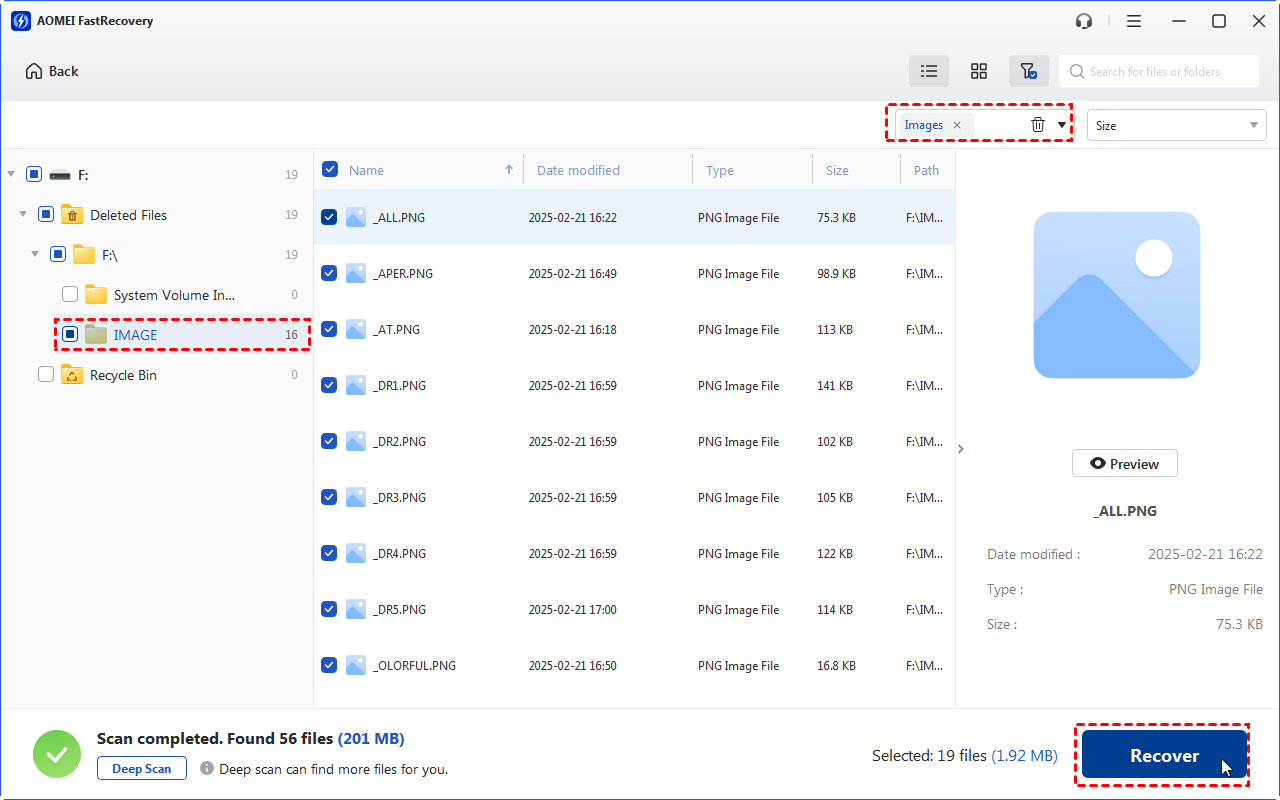
Step 4. Wait for the process to complete, then select files by Type (default) or Path, with options to sort, search, filter, and preview files.
👉Under the Type section:
- Specify the data type and click the arrow next to type, size, date modified, etc., to sort files.
- To locate files quickly, type the file name or extension in the search box.
- Or use the filter feature, similar to the Type category, allowing you to further specify the size of files, from less than 512 KB to 1GB above.
- Once found, double-click the files to preview.
👉 Under the Path section: Directly navigate to the original location where you saved deleted files. Sort files if needed.
- The Type categories and filter options include all supported data types, such as images, videos, documents, mails, web pages, compressed files, etc.
- Click the Deep Scan to find more data if Quick Scan fails. It will scan every sector of the disk and take longer.
Step 5. Select the files you want to recover and click Recover. Please select a new location to save them safely.
- Always recover files to a different location (not the Helium drive) to avoid data overwriting, making recovery more difficult.
-
The free edition can recover data from Helium hard drive for free, up to 500MB in total. To recover unlimited files, try the advanced editions.
In conclusion, while DIY software tools can be effective for less complex issues, such as accidental deletion, software errors, empty Recycle Bin, etc., they are not suitable for hardware-related failures, requiring to open Helium drives, as you cannot handle the sealed environment and complex components of a helium hard drive very well because it all requires specialized tools.
Conclusion
With professional services or DIY tools, you can perform Helium hard drive data recovery effectively. Be sure to check the possible cause, and you can then determine the recovery method.
For minor or logical errors, it’s worth trying data recovery tools like FastRecovery. But you can’t use it for Helium drives with physical damage, as you can’t deal with their sealed environments and complex components well after opening it.
FAQs
1. Can helium hard drives be recovered if the data is overwritten?
Once data is overwritten on a helium hard drive, it’s usually lost. However, in some cases, professional recovery services may still be able to recover parts of the overwritten data, depending on the extent of the overwrite and the drive’s condition.
2. What is the lifespan of helium hard drives, and does it affect data recovery?
Helium hard drives typically last 3 to 5 years. As they age, the chances of failure increase, making data recovery harder and potentially more expensive. Taking good care of the drive and backing up regularly can help extend its lifespan.
3. How much does helium hard drive data recovery cost?
Data recovery for helium hard drives can cost between $500 and $3,000, depending on the type of damage. If it’s a physical issue (like a motor failure) or a more complex case, the price can be on the higher end.
4. Is data recovery from helium drives faster than regular drives?
No, data recovery from helium drives isn’t necessarily faster. The process can be more time-consuming due to the special tools and expertise needed, especially if the drive is physically damaged.
5. Can I recover data from a helium drive that has been physically damaged?
Yes, it’s possible, but you’ll need professional help. If the drive is physically damaged (like a broken part or motor failure), recovery requires specialized equipment and clean-room procedures. The success depends on the extent of the damage, and in some cases, recovery might not be possible.
 100%
Clean & Secure
100%
Clean & Secure