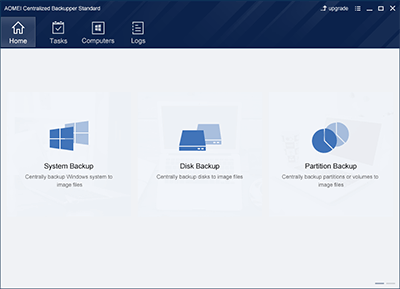
AOMEI Centralized Backupper Standard Overview

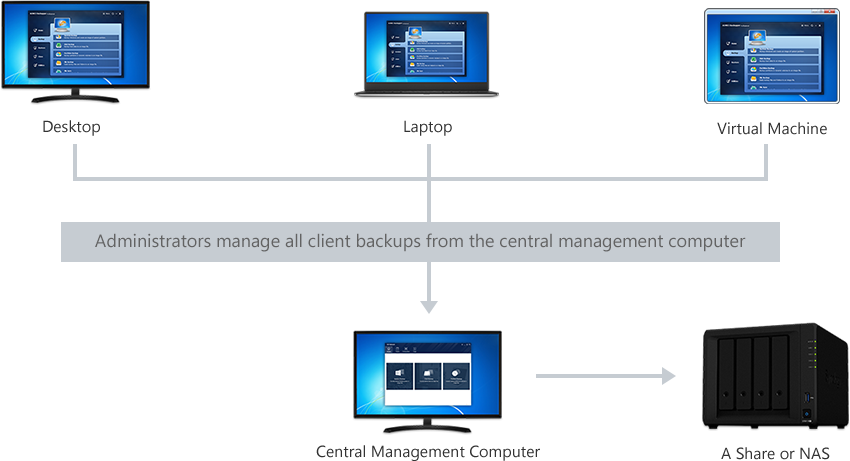
AOMEI Centralized Backupper Standard, a FREE centralized backup management solution that enables you to create and manage backup tasks for all desktop PCs, laptops and virtual machines within LAN from a single central management computer.

ACB Standard cuts down backup administration costs and save much time, you can use a computer as a central server to start, schedule, stop and monitor remote backup jobs for all clients within the network. Once you have ACB installed on the central computer and the client program installed on the computers you'd like to backup, it's very easy to centrally manage and backup system, disks or partitions of all these client computers to a network share or NAS. ACB Standard fully supports Windows 10, 8.1, 8, 7, Vista,XP (all editions, 32/64-bit).
Key Features

Central Backup
Centrally create a single task to backup system, disks or partitions for all client computers to a network share or NAS. Besides, any open files or running applications can be backed up without problems or interruption.
Automatic Scan
Automatically scan and list all the online networked computers with AOMEI Backupper client program installed. To control them, just enter login information (domain account supported) or send a request.
Group Client Computers
To make backup management easy, you are allowed to divide client computers into different groups, such as sales dept, technical dept, finance dept. Support to group client computers via IP segment.
Schedule Backup
Set up a schedule to automatically run full or incremental backups. You can perform an automatic backup daily, weekly monthly or based on an event, such as system startup, system shutdown, etc.
Flexible Backup Rules
Disk and partition backups allow you to specify what will be backed up by creating a template based on one of client computers or choosing specified disks, disk number, partition number, drive letters or partition labels to match.
Complete Backup Settings
Customizing backups based on your preferences and needs. For example, add comments, choose backup compression level, split backup images and so on.
Logs Report
Centrally view backup status at a glance to examine any backups and diagnose any failures. Also, you can generate log reports (HTML format) with 1-click.
Remote Client Management
The centralized client management tool enables you to remotely install, update or uninstall AOMEI Backupper client program from the computers you'd like to backup.
Add Offline Computers
Add offline controlled computers to a backup task and these computers will automatically execute the backup task once they're online.
Installation Package with Authorization Code
Create an installation package with authorization code. Once the client computers have installed the package, the central computer will be automatically authorized with control permission.
Network Share/NAS Management
Add/remove network share/NAS on the frequently used list and manage the account, password and storage.

How It Works

1. Install AOMEI Centralized Backupper on one of the computers within LAN and it will be the "Central Management Computer".
2. Install AOMEI Backupper Standard (client program) on the computers you'd like to backup.
3. AOMEI Centralized Backupper will list all client computers under "Computers" -> "Uncontrolled Computers", and then remotely get the control permission by sending authorization request or entering usernames and passwords.
4. Centrally create backup tasks of system, disks or partitions for controlled client computers, and save the backup images to a network share or NAS.
Tips: If you want to backup system, disks or partitions in virtual machines (VMware, VirtualBox, Hyper-V, etc), please install AOMEI Backupper Standard in the virtual machines.

Resources

If you are not familiar with how to use AOMEI Centralized Backupper or have some questions about it, please refer to the resources below

Quick Start Guide Video Tutorial Technical FAQs