Why Upgrade to AOMEI Partition Assistant Pro Now?

More Advanced Features

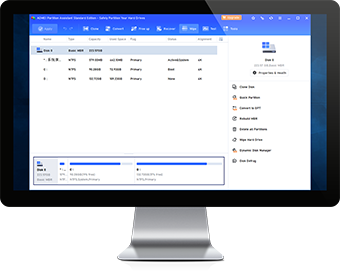
Upgrade to enjoy more benefits and advanced features like OS migration, GPT system disk clone, system disk conversion between MBR and GPT, etc.

Largest Discount Ever

15% OFF to get a professional hard drive partition manager could be one of your best deals of the day.

24/7/365 Lifetime Support

Our skilled engineering team listen to the customer needs and answer any technical queries for free within 24 hours.

Absolutely Risk-free

We offer a 90-Day Unconditional Money Back Guarantee. If you are not satisfied, we promise to refund your money.

Now or Never

Opportunity waits for no one. The biggest discount for upgrading is only valid for 24 hours. Grab it now.

Lifetime Upgrades

You're entitled to upgrade for FREE to any newest version without paying extra fee!

Unlock "Data Wipe"

Erase all data permanently on selected hard drive or partition with advanced methods to prevent sensitive data from being recovered.

Unlock "Primary/Logical" Converter"

Convert partition from logical to primary, or from primary to logical without data loss.

Unlock "GPT/MBR Disk Converter"

Convert your system disk from GPT to MBR, or from MBR to GPT without data loss.

Unlock "System Disk Clone"

Clone system disk to another HDD or SSD and ensure Windows boot from destination disk successfully.

Unlock "Dynamic Volume Management"

Manage dynamic disks safely and easily by resizing/expanding/shrinking/creating dynamic volumes.

Unlock "Dynamic Disk Converter"

Convert dynamic disk to basic disk without losing any data.

Unlock "Migrate OS to SSD"

Migrate operating system from HDD to another SSD or HDD without reinstalling Windows and applications.

Unlock "SSD Secure Erase Wizard"

Securely erase SSD to reset your SSD to its factory state for peak performance.

Unlock "Partition Recovery Wizard"

1-click to search and recover lost or deleted partitions to get data back.

Unlock Extend Partition Wizard

Step by step wizard to extend a partition by taking free space from other partitions on the same disk without rebooting.

Unlock "Rebuild MBR"

Repair unbootable issues due to the damaged Master Boot Record without destroying any data.

Unlock "Allocate Free Space"

Move free space from one partition to another without losing data.

Unlock "Make Bootable Media"

Create a Windows PE bootable CD/DVD or USB to troubleshoot disk partition problems when the system fails to boot.

Unlock "Split Partition"

Divide one large partition into multiple smaller partitions to save different kinds of files.

Unlock Windows To Go Creator

Install customized Windows 10, 8.1/8, 7 on removable USB drive to boot it from any computer.

Unlock "Quick Partition"

1-click to partition a hard drive with your own presetting values.

Unlock "Partition Alignment"

Align partitions correctly to speed up your SSD and increase SSD lifespan.

Which Edition Is Right for You?

Need help to choose the most suitable edition? Learn the different editions of AOMEI Partition Assistant and choose the right one based on your needs, or email us: [email protected]

AOMEI
Partition Assistant

PA Standard
Free

Freeware

PA Professional
$39.95
Yearly Subscription

Automatic renewal. Free get new versions until you cancel the subscription.

Lifetime Upgrades

One-time payment. Lifetime free upgrades to any later new versions.

PA Server
$149.00
Yearly Subscription

Automatic renewal. Free get new versions until you cancel the subscription.

Lifetime Upgrades

One-time payment. Lifetime free upgrades to any later new versions.

PA Unlimited
$399.00
Yearly Subscription

Automatic renewal. Free get new versions until you cancel the subscription.

Lifetime Upgrades

One-time payment. Lifetime free upgrades to any later new versions.

PA Technician
$599.00
Yearly Subscription

Automatic renewal. Free get new versions until you cancel the subscription.

Lifetime Upgrades

One-time payment. Lifetime free upgrades to any later new versions.

System Requirements

Windows PCs Windows 10, 8.1, 8, 7, Vista, XP

Windows Server Windows Server 2019, 2016, 2012 R2, 2012, 2008 R2, 2008, 2003, 2003 R2, Windows Home Server 2011, Windows Small Business Server 2011, Windows Small Business Server 2008, Windows Small Business Server 2003

Availability of License

The maximum number of computers allowed to install the program
2 PCs / License 2 Servers / License Unlimited PCs and Servers / License Unlimited PCs and Servers / License
Business use
Unlimited number of PCs/laptops/ Servers within a company
Provide billable technical service to clients

Hard Disk Partition Management

Resize/ move Partition
Merge Partitions
Create Partition
Delete Partition
Format Partition
Initialize Disk
Check Partition
Surface Test
Clone Partition
Clone Disk
Rebuild MBR
Change Drive Letter
Set Active Partition
Change Drive
Hide/unhide Partition
Split Partition
Allocate Free Space
Partition Alignment
Quick Partition
Change Serial Number
Command Line Partitioning

Migrate OS Software

Migrate OS from MBR to MBR disk
Migrate OS from MBR to GPT disk
Migrate OS from GPT to MBR/GPT DISK

Hard Disk Converter

Convert file system between FAT32 and NTFS
Convert data disk between MBR and GPT
Convert system disk between MBR and GPT
Convert primary partition to logical partition
Convert logical partition to primary partition
Convert dynamic disk to basic disk

Disk Cleaner

Wipe system disk
Partial
Wipe partition
Partial
Wipe hard drive
Partial
SSD Secure Erase

Powerful Wizard

Disk clone wizard
Partial
Partition clone wizard
Partial
Make bootable CD wizard
Partial
Partition recovery wizard
Extend partition wizard
SSD secure erase wizard

Other Capabilities

Integrate to RE
Dynamic disk management
We Accept:

Sales FAQ

  • What’s the refund policy?

    We offer a 90-Day Unconditional Money-Back Guarantee. If you are not completely satisfied with the product you purchased from us, you should notify us within 90 days from the date of the purchase and we will provide you with a full refund. When you request a refund, our customer service representatives may inquire about the reason for your refund so we can improve our products and our customer experience.

  • Why the price on the order page is higher than that of your store and how to avoid it rightly?

    It's due to the VAT (Value Added Tax). The list price on our store does not include VAT. VAT is a general consumption tax assessed on the value added to goods and services and is borne ultimately by the final consumer. If you have the privilege of VAT Exemption, please enter VAT Exemption ID at the checkout.

  • Which methods can be used for payment?

    We accept Paypal, VISA, Mastercard, JCB, Discover, Sofort, Wire transfer, Direct debit, iDEAL, Konbini, and check cards or ATM cards connected with one of the major credit card companies listed above. We also accept Bank/Wire Transfer, Check/Money Order, Fax - Credit Card, Invoice.

  • What’s the product delivery policy and is there an invoice?

    Real-time delivery. Usually, once your order is processed successfully, the download link, license code and an electronic invoice of the software will be immediately sent to your email.

  • What after-sales services are available?

    We provide lifetime free technical support via email so far. If you have any problem about our products, we recommend you send us email with your problem. Also, you are also welcomed to ask questions on AOMEI Twitter, Facebook and Forum. Upgrade Policy: Minor updates are free. For the major upgrades, you only need to pay a small amount of upgrade fee to enjoy the full set of advantages of later new versions. If you have already purchased "Lifetime Free Upgrades" before, you can upgrade to the latest version without extra pay in the future.

Reviews & Testimonials

  • As partitioning software, AOMEI Partition Assistant is as good as any program I’ve seen. The standard version is more than adequate for most users, and the pro version is as good as it gets. I have some nits concerning, but the Windows To Go trick trumps those gripes big time.

  • AOMEI Partition Assistant would seem to be the most powerful and capable freeware disk partition utility we've tried. It's highly recommended for all users, and especially those with multidisk systems.

  • AOMEI Partition Assistant is an easy-to-use tool to help you set up and manage partitions on your PC's hard drive. The program provides all the functionality you'd expect, and some you might not.

  • Emmett Cressman

    The first download worked fine. I did a bit of work with PA this evening, and it works well! I just wanted to var you know that I think Partition Assistant is a great product. The user interface is well-designed and easy to follow.

  • Jeff Franklin

    I basically gave up on trying to switch my HDD to GPT without formatting it. I downloaded AOMEI partition assistant and it switched it in seconds without deleting all my stuff! I love you! Thanks!

  • Cameron Fatemi

    I'm a professional computer tech with my own concierge business. I've researched plenty of similar software. Yours is the best in the world! Keep up the great work.

BEST SELLER BUNDLES

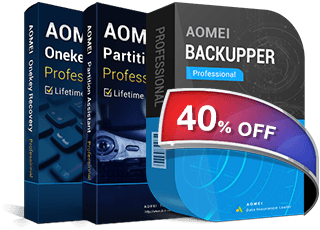
AOMEI Backupper Professional + AOMEI Partition Assistant Professional + AOMEI OneKey Recovery Pro

The best value bundle pack for home. All of them can be used on you personal computer. One-time purchase, lifetime free upgrade to every latest version.

$95.91 $159.85
Save Now