FastRecovery



Free! Two Ways to Recover LOST.DIR Files on SD Card
LOST.DIR folder on SD card helps collect lost folders when your mobile phone is working. If you are looking for a free solution to recover LOST.DIR files, just try either method in this guide to get the wanted files back.

By Demi / Updated on May 11, 2026


What is LOST.DIR file
As a system folder, the LOST.DIR folder saves the interrupted or damaged files on your mobile phone. When you launch the folder, you will find it is stuffed with corrupted, unformatted files, which are created automatically when you perform certain activities on the phone.

What is the LOST.DIR file? It can be a crash file created when your device suddenly shuts off while you’re running an app. It can also be an unfinished internet download file and a file that was corrupted as a result of the SD card being removed.
Some of the files saved in the LOST.DIR folder may still be important for you. If you need a free and simple way to recover data from the LOST.DIR folders, there are two ways in this guide to do you a favor.
Way 1. Recover LOST.DIR files by writing filename extension
If you wonder how to recover files from LOST.DIR without PC, you can try to add a file name extension to each file inside the LOST.DIR folder. It can modify the file’s format, making it readable on the specific mobile apps.
You can rename the files in the LOST.DIR folder in batch or in sequence depending on the file manager you’re using. You can be free to recover LOST.DIR files by writing a file name extension in three steps below.
Step 1. Choose the files you want to modify from the SD card in the file manager on your phone;
Step 2. Tap the More icon (often represented by three vertical dots in a column (:)).
Step 3. Choose rename and give the file a name an extension.
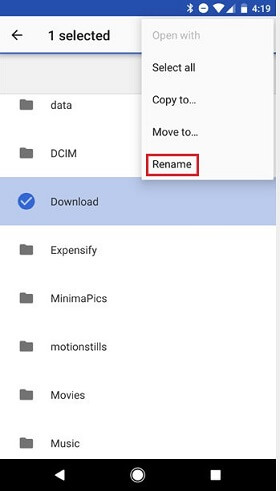
Assuming the filename is "hitlmso," you should change it to hitlmso.mp3, hitlmso.doc, or hitlmso.jpg by putting the appropriate extension to the name.
After the filename has been modified and an extension added, you can now try to open the file using supported mobile apps on your phone.
Way 2. Recover LOST.DIR files with data recovery software
Some people see the LOST.DIR folder as a “virus” and delete the folder. If that also happens to you, you may find your phone begins to misbehave. What’s worse, you cannot make use of the first method to recover files from the LOST.DIR folder. Then, you may ask yourself: how do I recover LOST.DIR files?
The best LOST.DIR files recovery software free download
You can use FastRecovery to do that. FastRecovery is a handy software that allows you to perform data recovery tasks in an as simple as ABC way.
Here are some features and advantages of FastRecovery:
• Recover 1000+ types of data. The SD card, including the LOST.DIR folder may save your pictures, videos, texts, etc. You could retrieve all lost files from them via FastRecovery.
• No data loss. With the help of FastRecovery, the data on the SD card or the LOST.DIR folder can be retrieved while preserving its original quality.
• High success rate for data recovery. The scanning method of Quick Scan & Deep Scan, equipped with advanced technology, helps recover data without any errors.
• Support different data loss scenarios. FastRecovery is perfectly compatible with HDD/SSD. It is also possible to unformat SD card. Data lost due to system crashes, virus attacks, and so on can also be recovered with it.
Free download FastRecovery by clicking the icon below. Let’s get started to recover LOST.DIR files within simple steps.
Steps to recover LOST.DIR files via FastRecovery
Here are simple steps to recover LOST.DIR files.
-
Don't download and install FastRecovery on the drive where you store deleted files, as this may cause data overwriting.
-
Any newly added data or disk formatting can overwrite data. Please avoid these operations after realizing data loss.
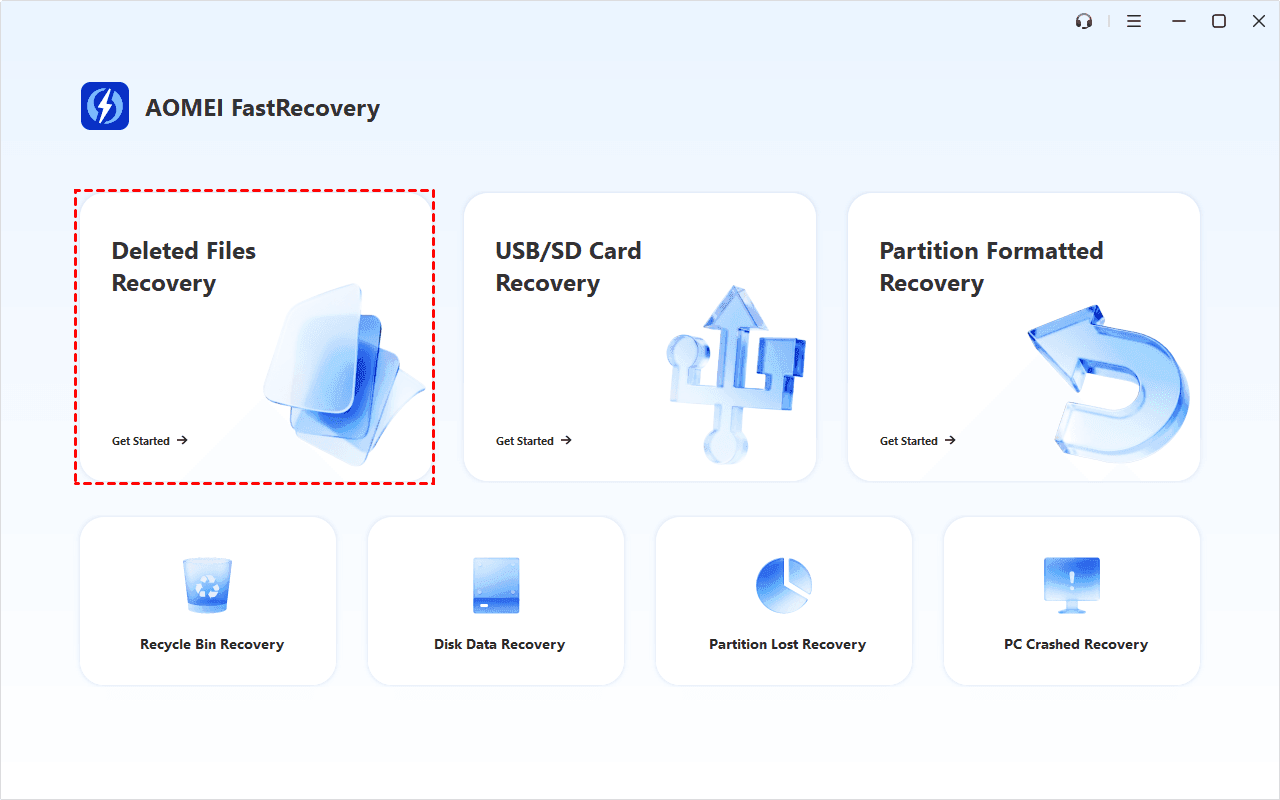
Step 1. Open FastRecovery, then click Deleted Files Recovery for fast recovery. You can also choose a more suitable alternative. All of them can help you retrieve data without causing any damage.
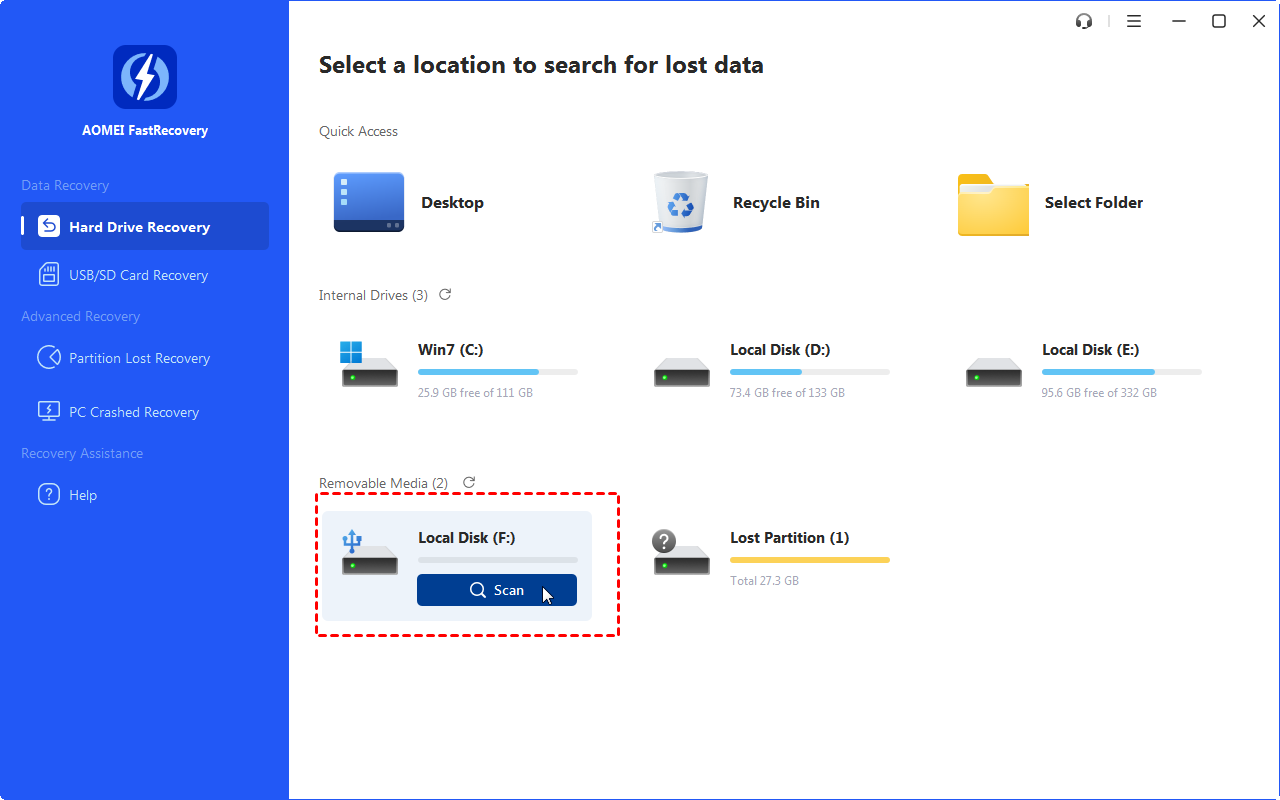
Step 2. Hover the mouse over the SD card drive > Click Scan to begin.
Step 3. The Quick Scan makes the process quick. You won't have to wait long. Scan time mainly depends on disk size and health, especially regarding bad sectors or file system corruption.

Step 4. Wait for the process to complete. Then, type lost.dir in the search box and click the name, date modified, type, etc., to sort files quickly. Once found, double-click the files to preview them.
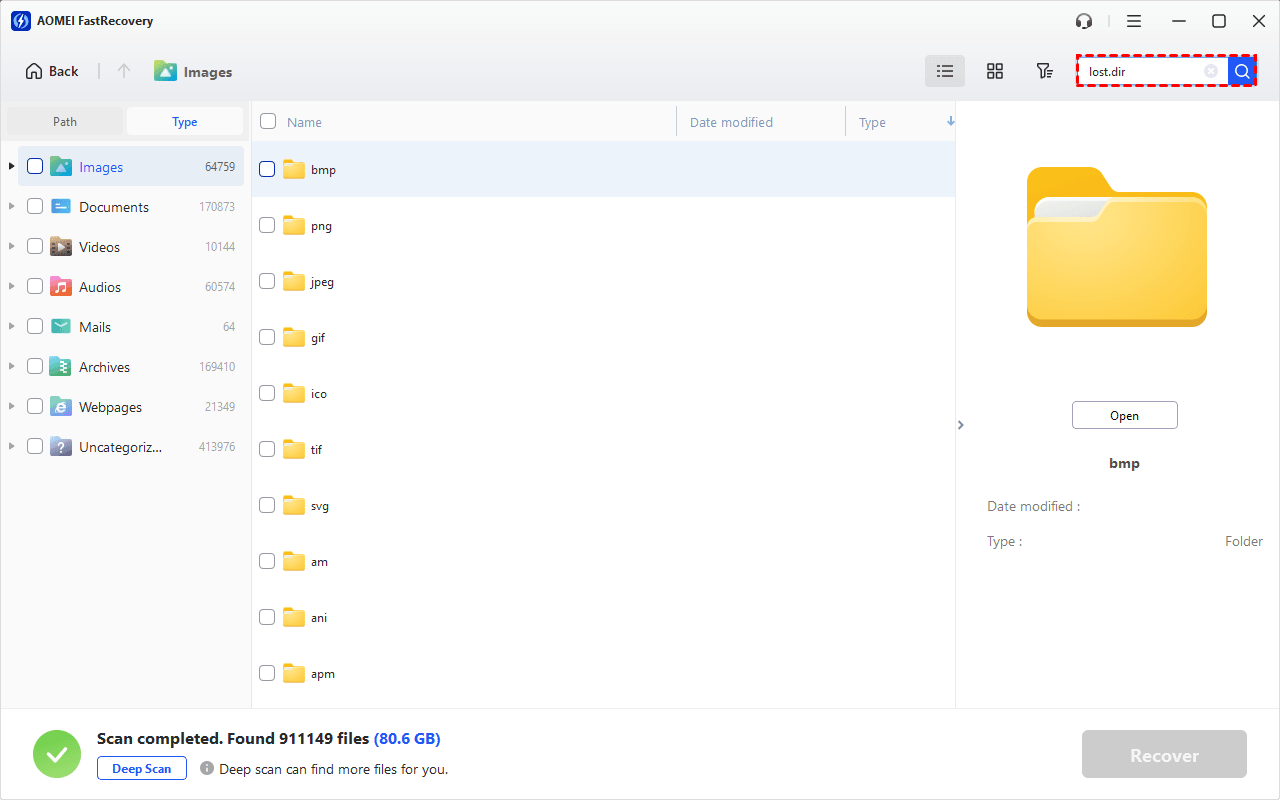
- You can also use the filter option to narrow your search. It allows you to specify different data types and file sizes, from less than 512KB to 1GB above.
- Click the Deep Scan to find more data if Quick Scan fails. It will scan every sector of the disk and take longer.
Step 5. Choose the files you want to recover > Click Recover> Choose a new location instead of the original SD card.
Conclusion
That’s all for how to recover LOST.DIR files for free. You can write the extension name of files to make it readable on your phone. If you have deleted the folder on your device, you can rely on the data recovery software - FastRecovery to make it. If this guide helps you, please share it with others.
 100%
Clean & Secure
100%
Clean & Secure